
在 Spring Boot 项目中使用 Canal,主要是为了监听 MySQL 的 binlog 日志,实现数据变更的实时同步或触发业务逻辑(如更新缓存、记录日志、数据同步等)。Canal 是阿里巴巴开源的 MySQL binlog 增量订阅 & 消费组件。
下面是 Spring Boot 集成 Canal 的基本步骤:
一、前提条件
- MySQL 开启 binlog(必须为 ROW 模式):
   [mysqld]
   log-bin=mysql-bin
   binlog-format=ROW
   server-id=1
如果是使用docker的话,修改完配置文件后需要运行docker restart来重启容器,重新加载配置。
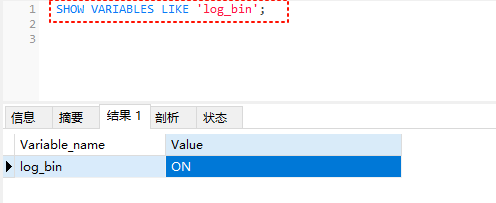
重启后,通过数据库工具连接到数据,执行一下SQL语句,确保binlog选项已经开启了
SHOW VARIABLES LIKE 'log_bin';
- 创建 Canal 所需的 MySQL 用户(具有 REPLICATION 权限):
   CREATE USER canal IDENTIFIED BY 'canal';
   GRANT SELECT, REPLICATION SLAVE, REPLICATION CLIENT ON *.* TO 'canal'@'%';
   FLUSH PRIVILEGES;
二、部署 Canal Server
你可以选择:
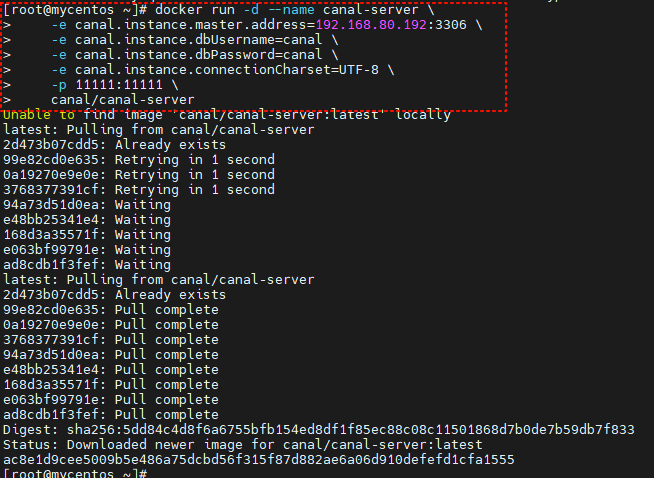
- 使用 Docker 快速启动:
  docker run -d --name canal-server \
    -e canal.instance.master.address=your-mysql-host:3306 \
    -e canal.instance.dbUsername=canal \
    -e canal.instance.dbPassword=canal \
    -e canal.instance.connectionCharset=UTF-8 \
    -p 11111:11111 \
    canal/canal-server
- 或者下载 Canal Server 手动部署(参考官方文档:https://github.com/alibaba/canal)
Canal Server 默认监听 11111 端口,客户端通过 TCP 或 Kafka/ RocketMQ 消费 binlog。

三、Spring Boot 项目中集成 Canal Client
方式一:使用 TCP 直连 Canal Server(简单场景)
- 添加依赖(Maven):
<dependency>
    <groupId>com.alibaba.otter</groupId>
    <artifactId>canal.client</artifactId>
    <version>1.1.0</version>
</dependency>
- 编写 Canal 客户端监听类:
package com.shenmazong.serverdemocanal.config;


import com.alibaba.otter.canal.client.CanalConnector;
import com.alibaba.otter.canal.client.CanalConnectors;
import com.alibaba.otter.canal.protocol.CanalEntry;
import com.alibaba.otter.canal.protocol.Message;
import com.google.protobuf.InvalidProtocolBufferException;
import jakarta.annotation.PostConstruct;
import org.springframework.stereotype.Component;

import java.net.InetSocketAddress;
import java.util.List;

/**
 * @author 军哥
 * @version 1.0
 * @description: TODO
 * @date 2025/11/6 14:36
 */

@Component
public class CanalClient {

    @PostConstruct
    public void run() {
        // 创建连接
        CanalConnector connector = CanalConnectors.newSingleConnector(
                new InetSocketAddress("192.168.80.192", 11111), "example", "canal", "canal");

        int batchSize = 1000;
        int emptyCount = 0;
        try {
            connector.connect();
            connector.subscribe("db_hotel\\.tb_user"); // 正则匹配
            connector.rollback(); // 回滚到未确认位置

            while (true) {
                Message message = connector.getWithoutAck(batchSize);
                long batchId = message.getId();
                int size = message.getEntries().size();

                if (batchId == -1 || size == 0) {
                    emptyCount++;
                    if (emptyCount > 10) {
                        Thread.sleep(1000);
                    }
                } else {
                    emptyCount = 0;
                    printEntry(message.getEntries());
                }

                connector.ack(batchId); // 确认消费
            }
        } catch (Exception e) {
            e.printStackTrace();
        } finally {
            connector.disconnect();
        }
    }

    private void printEntry(List<CanalEntry.Entry> entrys) {
        for (CanalEntry.Entry entry : entrys) {
            if (entry.getEntryType() == CanalEntry.EntryType.TRANSACTIONBEGIN
                    || entry.getEntryType() == CanalEntry.EntryType.TRANSACTIONEND) {
                continue;
            }

            CanalEntry.RowChange rowChg;
            try {
                rowChg = CanalEntry.RowChange.parseFrom(entry.getStoreValue());
            } catch (InvalidProtocolBufferException e) {
                throw new RuntimeException("解析 binlog 出错", e);
            }

            CanalEntry.EventType eventType = rowChg.getEventType();
            String tableName = entry.getHeader().getTableName();

            for (CanalEntry.RowData rowData : rowChg.getRowDatasList()) {
                if (eventType == CanalEntry.EventType.DELETE) {
                    // 处理删除
                    handleDelete(tableName, rowData);
                } else if (eventType == CanalEntry.EventType.INSERT) {
                    // 处理插入
                    handleInsert(tableName, rowData);
                } else if (eventType == CanalEntry.EventType.UPDATE) {
                    // 处理更新
                    handleUpdate(tableName, rowData);
                }
            }
        }
    }

    private void handleInsert(String tableName, CanalEntry.RowData rowData) {
        System.out.println("INSERT on table: " + tableName);
        rowData.getAfterColumnsList().forEach(col ->
                System.out.println(col.getName() + " = " + col.getValue()));
    }

    private void handleUpdate(String tableName, CanalEntry.RowData rowData) {
        System.out.println("UPDATE on table: " + tableName);
        System.out.println("Before: ");
        rowData.getBeforeColumnsList().forEach(col ->
                System.out.println(col.getName() + " = " + col.getValue()));
        System.out.println("After: ");
        rowData.getAfterColumnsList().forEach(col ->
                System.out.println(col.getName() + " = " + col.getValue()));
    }

    private void handleDelete(String tableName, CanalEntry.RowData rowData) {
        System.out.println("DELETE on table: " + tableName);
        rowData.getBeforeColumnsList().forEach(col ->
                System.out.println(col.getName() + " = " + col.getValue()));
    }
}
注意:
@PostConstruct启动后会阻塞主线程,生产环境建议使用单独线程或异步任务。
方式二:通过 Kafka/RocketMQ 消费(推荐用于生产)
Canal Server 可配置将 binlog 投递到 Kafka,Spring Boot 项目作为 Kafka 消费者监听即可,解耦更清晰。
- 在
canal.properties中启用 Kafka:
   canal.serverMode = kafka
   canal.mq.servers = localhost:9092
- 在
instance.properties中指定 topic:
canal.mq.topic=your-binlog-topic
- Spring Boot 中使用
@KafkaListener消费消息(需引入 Spring Kafka)。
四、注意事项
- 幂等性处理:binlog 可能重复消费,业务逻辑需幂等。
- 异常处理:网络中断、反序列化失败等需重试或告警。
- 性能:高并发场景建议使用消息队列模式(Kafka/RocketMQ)。
- 字段类型:binlog 中的值均为字符串,需自行转换类型。
五、演示源码
https://gitee.com/ywbingchuan/server-demo-canal.git
六、参考资源
- Canal GitHub:https://github.com/alibaba/canal
- Canal 官方文档:https://github.com/alibaba/canal/wiki
- 项目源码:
如需我提供一个完整的 Spring Boot + Canal 示例项目结构,也可以告诉我!