1、 配置Redis过期事件通知
修改Redis配置(redis.conf)
# 启用键空间事件通知
notify-keyspace-events Ex
# 或更详细的事件类型
notify-keyspace-events KEA
事件类型说明:
K:键空间事件E:键事件事件x:过期事件e:驱逐事件(内存满时)A:所有事件
2、如何查看当前的过期事件设置
# 连接到Redis
redis-cli

# 查看键空间事件配置
127.0.0.1:6379> CONFIG GET notify-keyspace-events

# 或者查看所有配置
127.0.0.1:6379> CONFIG GET *
# 然后在输出中查找 notify-keyspace-events
3、临时设置过期事件配置
# 临时启用过期事件
127.0.0.1:6379> CONFIG SET notify-keyspace-events Ex

# 验证配置
127.0.0.1:6379> CONFIG GET notify-keyspace-events
# 进入Redis CLI动态修改配置
docker exec -it redis redis-cli -a yourpassword

# 动态修改配置(重启后失效)
127.0.0.1:6379> CONFIG SET maxmemory 2gb
127.0.0.1:6379> CONFIG REWRITE  # 将修改写回配置文件
4、修改配置文件(永久生效)
# 1. 编辑配置文件
vim /etc/redis/redis.conf

# 2. 找到并修改(或添加)配置
notify-keyspace-events Ex

# 3. 重启Redis
sudo systemctl restart redis

# 或者使用重载配置(如果支持)
redis-cli CONFIG REWRITE
5、使用docker指定配置文件
1、创建配置文件和数据目录
mkdir -p /server/redis/config
mkdir -p /server/redis/data
2、在 /server/redis/config 目录创建配置文件 redis.conf
notify-keyspace-events Ex
3、创建redis的docker容器
# 指定配置文件创建容器
docker run -p 6379:6379 \
--name redis6 \
-v /server/redis/config/redis.conf:/etc/redis/redis.conf \
-v /server/redis/data:/data \
-d redis:6.0-rc \
redis-server /etc/redis/redis.conf
6、在Springboot中如何监听Redis的Key过期事件
1)、添加Redis的依赖
 <dependencies>
     <dependency>
         <groupId>org.springframework.boot</groupId>
         <artifactId>spring-boot-starter-data-redis</artifactId>
     </dependency>
     <dependency>
         <groupId>org.projectlombok</groupId>
         <artifactId>lombok</artifactId>
     </dependency>
 </dependencies>
2)、配置Redis服务器信息
spring:
  redis:
    host: 192.168.80.192
    port: 6379
    password:
    listener:
      enabled: true
3)、定义配置类RedisListenerConfig
package com.ruoyi.system.redis;

import org.springframework.context.annotation.Bean;
import org.springframework.context.annotation.Configuration;
import org.springframework.data.redis.connection.RedisConnectionFactory;
import org.springframework.data.redis.listener.RedisMessageListenerContainer;

/**
 * @author 军哥
 * @version 1.0
 * @description: TODO
 * @date 2026/1/21 10:31
 */

@Configuration
public class RedisListenerConfig {


    @Bean
    RedisMessageListenerContainer container(RedisConnectionFactory connectionFactory) {

        RedisMessageListenerContainer container = new RedisMessageListenerContainer();
        container.setConnectionFactory(connectionFactory);
        return container;
    }

}
4)、定义监听器 实现KeyExpirationEventMessageListener接口
查看源码发现,该接口监听所有db的过期事件keyevent@*:expired"
定义Status1ExpirationListener监听状态1到期
package com.ruoyi.system.redis;

import lombok.extern.slf4j.Slf4j;
import org.springframework.beans.factory.annotation.Autowired;
import org.springframework.data.redis.connection.Message;
import org.springframework.data.redis.core.StringRedisTemplate;
import org.springframework.data.redis.listener.KeyExpirationEventMessageListener;
import org.springframework.data.redis.listener.RedisMessageListenerContainer;
import org.springframework.stereotype.Component;

/**
 * @author 军哥
 * @version 1.0
 * @description: TODO
 * @date 2026/1/21 10:32
 */

@Slf4j
@Component
public class Status1ExpirationListener extends KeyExpirationEventMessageListener {


    public Status1ExpirationListener(RedisMessageListenerContainer listenerContainer) {

        super(listenerContainer);
        log.warn("Status1ExpirationListener...............");

    }

    @Autowired
    private StringRedisTemplate stringRedisTemplate;

    @Override
    public void onMessage(Message message, byte[] pattern) {

        // message.toString()可以获取失效的key
        String expiredKey = message.toString();
        // 业务处理

        log.warn("1:" + expiredKey);

    }

}
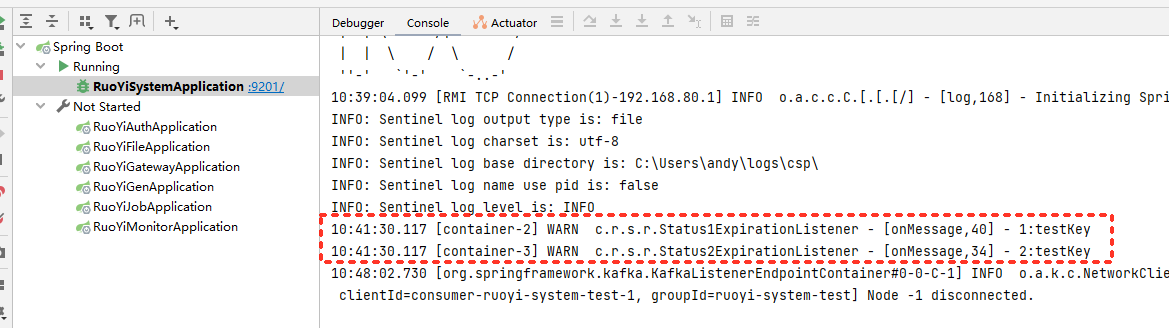
5)、测试效果
【警告】存在的问题
- Redis的Key事件通知机制默认是异步的,即Redis会在Key过期时发送事件通知给所有监听者,但是不能保证监听者一定会及时接收到通知。如果您的应用程序需要在Key过期后立即处理相关操作,可能需要使用其他方式来实现。
- 在Redis中,Key的过期时间只是一个近似的时间,它并不是精确的,因此不能保证过期时间到达时就一定会立即过期。如果您需要在Key过期后立即处理相关操作,建议您使用其他方式来实现,例如使用定时任务或轮询方式检查过期Key。
- 在Redis中,Key的过期时间不能被取消或重置。如果您在设计时考虑到Key的过期时间可能需要修改,建议您使用其他方式来实现。
- 当Redis中的Key被持久化到磁盘上时,过期时间可能会受到影响,因为过期时间的计算是基于系统时间的,如果系统时间发生变化,过期时间可能会出现不准确的情况。因此,建议您使用其他方式来处理需要精确过期时间的场景。