
1、安装依赖
npm install @amap/amap-jsapi-loader --save
# 或
pnpm add @amap/amap-jsapi-loader --save
2、添加类型声明
创建 src/types/global.d.ts 文件:
// 扩展Window类型,支持高德地图安全配置
interface Window {
  _AMapSecurityConfig: {
    securityJsCode: string;
  };
}

// 高德地图类型声明(根据需要补充)
declare namespace AMap {
  class Map {
    constructor(container: string, options?: any);
    destroy(): void;
    addControl(control: any): void;
    setCenter(center: [number, number]): void;
    // ... 其他方法
  }

  class Polygon {
    constructor(options?: any);
    setMap(map: Map): void;
    getPath(): any;
    contains(point: [number, number]): boolean;
    on(event: string, handler: Function): void;
  }

  class Circle {
    constructor(options?: any);
    setMap(map: Map): void;
    contains(point: [number, number]): boolean;
  }

  // 其他类型...
}
3. 创建电子围栏组件
src/components/ElectronicFence.vue:
<template>
  <div class="fence-container">
    <!-- 地图容器 -->
    <div id="mapContainer" class="map-wrapper"></div>

    <!-- 控制面板 -->
    <div class="control-panel">
      <h3>电子围栏管理</h3>

      <!-- 围栏类型选择 -->
      <div class="form-item">
        <label>围栏类型:</label>
        <select v-model="fenceType">
          <option value="polygon">多边形围栏</option>
          <option value="circle">圆形围栏</option>
          <option value="rectangle">矩形围栏</option>
        </select>
      </div>

      <!-- 绘制控制 -->
      <div class="form-item">
        <button @click="startDrawing" :disabled="isDrawing">
          {{ isDrawing ? '绘制中...' : '开始绘制' }}
        </button>
        <button @click="clearFence" :disabled="!currentFence">清除围栏</button>
        <button @click="saveFence" :disabled="!currentFence">保存围栏</button>
      </div>

      <!-- 模拟位置测试 -->
      <div class="form-item" v-if="currentFence">
        <label>测试位置:</label>
        <div class="coord-input">
          <input type="number" v-model.number="testLng" placeholder="经度" step="0.000001">
          <input type="number" v-model.number="testLat" placeholder="纬度" step="0.000001">
        </div>
        <button @click="testPosition">检测位置</button>
        <div class="test-result" :class="resultClass">
          {{ testResult }}
        </div>
      </div>

      <!-- 报警记录 -->
      <div class="alarm-log" v-if="alarmLogs.length > 0">
        <h4>报警记录</h4>
        <ul>
          <li v-for="(log, index) in alarmLogs" :key="index">
            {{ log.time }} - {{ log.message }}
          </li>
        </ul>
      </div>
    </div>
  </div>
</template>

<script setup lang="ts">
import { onMounted, onBeforeUnmount, ref, reactive, computed } from 'vue';
import AMapLoader from '@amap/amap-jsapi-loader';

// 配置参数(请替换为你的实际key)
const AMAP_KEY = '你的高德地图Key';
const SECURITY_CODE = '你的安全密钥';

// 状态变量
const map = ref<any>(null);
const currentFence = ref<any>(null);
const fenceType = ref<'polygon' | 'circle' | 'rectangle'>('polygon');
const isDrawing = ref(false);
const testLng = ref(116.397428);
const testLat = ref(39.90923);
const testResult = ref('');
const alarmLogs = ref<Array<{ time: string; message: string }>>([]);
const lastInsideState = ref<boolean | null>(null); // 记录上次状态,避免重复报警

// 配置安全密钥
window._AMapSecurityConfig = {
  securityJsCode: SECURITY_CODE,
};

// 初始化地图
onMounted(() => {
  initMap();
});

// 组件销毁前清理
onBeforeUnmount(() => {
  if (map.value) {
    map.value.destroy();
  }
});

// 初始化地图
const initMap = async () => {
  try {
    const AMap = await AMapLoader.load({
      key: AMAP_KEY,
      version: '2.0',
      plugins: [
        'AMap.ToolBar',
        'AMap.Scale',
        'AMap.PolygonEditor',
        'AMap.CircleEditor'
      ],
    });

    // 创建地图实例
    map.value = new AMap.Map('mapContainer', {
      zoom: 12,
      center: [116.397428, 39.90923],
      mapStyle: 'amap://styles/normal',
      viewMode: '2D',
    });

    // 添加控件
    map.value.addControl(new AMap.ToolBar());
    map.value.addControl(new AMap.Scale());

    console.log('地图初始化成功');
  } catch (error) {
    console.error('地图加载失败:', error);
  }
};

// 开始绘制围栏
const startDrawing = () => {
  if (!map.value) return;

  isDrawing.value = true;

  // 根据类型创建不同围栏
  if (fenceType.value === 'polygon') {
    drawPolygon();
  } else if (fenceType.value === 'circle') {
    drawCircle();
  } else if (fenceType.value === 'rectangle') {
    drawRectangle();
  }
};

// 绘制多边形围栏
const drawPolygon = () => {
  const AMap = (window as any).AMap;

  // 创建多边形
  const polygon = new AMap.Polygon({
    path: [
      [116.403322, 39.920255],
      [116.410703, 39.897555],
      [116.402292, 39.892353],
      [116.389732, 39.898256],
      [116.387671, 39.912482]
    ],
    strokeColor: '#FF33FF',
    strokeWeight: 6,
    strokeOpacity: 0.8,
    fillColor: '#1791fc',
    fillOpacity: 0.4,
    strokeStyle: 'dashed',
    draggable: true,
  });

  polygon.setMap(map.value);
  currentFence.value = polygon;

  // 添加编辑工具
  const polygonEditor = new AMap.PolygonEditor(map.value, polygon);
  polygonEditor.open();

  // 监听绘制完成
  setTimeout(() => {
    isDrawing.value = false;
  }, 500);
};

// 绘制圆形围栏
const drawCircle = () => {
  const AMap = (window as any).AMap;

  const circle = new AMap.Circle({
    center: [116.397428, 39.90923],
    radius: 1000, // 半径(米)
    strokeColor: '#FF33FF',
    strokeWeight: 6,
    fillColor: '#1791fc',
    fillOpacity: 0.4,
    draggable: true,
  });

  circle.setMap(map.value);
  currentFence.value = circle;

  const circleEditor = new AMap.CircleEditor(map.value, circle);
  circleEditor.open();

  setTimeout(() => {
    isDrawing.value = false;
  }, 500);
};

// 绘制矩形围栏(特殊的多边形)
const drawRectangle = () => {
  const AMap = (window as any).AMap;

  const rectangle = new AMap.Polygon({
    path: [
      [116.368724, 39.926489],
      [116.427081, 39.926489],
      [116.427081, 39.882619],
      [116.368724, 39.882619]
    ],
    strokeColor: '#FF33FF',
    strokeWeight: 6,
    fillColor: '#1791fc',
    fillOpacity: 0.4,
    draggable: true,
  });

  rectangle.setMap(map.value);
  currentFence.value = rectangle;

  const polygonEditor = new AMap.PolygonEditor(map.value, rectangle);
  polygonEditor.open();

  setTimeout(() => {
    isDrawing.value = false;
  }, 500);
};

// 清除围栏
const clearFence = () => {
  if (currentFence.value) {
    currentFence.value.setMap(null);
    currentFence.value = null;
    testResult.value = '';
    lastInsideState.value = null;
  }
};

// 保存围栏(可扩展为保存到后端)
const saveFence = () => {
  if (!currentFence.value) return;

  let fenceData = null;

  if (fenceType.value === 'circle') {
    fenceData = {
      type: 'circle',
      center: currentFence.value.getCenter(),
      radius: currentFence.value.getRadius(),
    };
  } else {
    fenceData = {
      type: fenceType.value,
      path: currentFence.value.getPath(),
    };
  }

  console.log('保存围栏数据:', fenceData);
  alert('围栏已保存(请查看控制台数据)');

  // TODO: 发送到后端
};

// 测试位置是否在围栏内
const testPosition = () => {
  if (!currentFence.value || !map.value) {
    testResult.value = '请先绘制围栏';
    return;
  }

  const point: [number, number] = [testLng.value, testLat.value];
  const isInside = currentFence.value.contains(point);

  const currentTime = new Date().toLocaleTimeString();
  const insideState = isInside;

  // 判断状态变化,避免重复报警
  if (lastInsideState.value !== null && lastInsideState.value !== insideState) {
    // 状态发生变化,触发报警
    const alarmMessage = insideState
      ? '⚠️ 车辆进入围栏'
      : '⚠️ 车辆离开围栏';

    alarmLogs.value.unshift({
      time: currentTime,
      message: alarmMessage,
    });

    // 只保留最近10条记录
    if (alarmLogs.value.length > 10) {
      alarmLogs.value.pop();
    }
  }

  lastInsideState.value = insideState;

  testResult.value = isInside
    ? '✅ 当前位置在围栏内部'
    : '❌ 当前位置在围栏外部';

  // 在地图上添加临时标记点
  addTempMarker(point);
};

// 添加临时标记点
const addTempMarker = (position: [number, number]) => {
  const AMap = (window as any).AMap;

  // 移除之前的标记
  const prevMarker = document.querySelector('.temp-marker');
  if (prevMarker) {
    (prevMarker as any)._marker?.setMap(null);
  }

  const marker = new AMap.Marker({
    position: position,
    map: map.value,
    icon: 'https://webapi.amap.com/theme/v1.3/markers/n/mark_r.png',
    offset: new AMap.Pixel(-10, -30),
    className: 'temp-marker',
  });

  (marker as any)._marker = marker;

  // 3秒后移除标记
  setTimeout(() => {
    marker.setMap(null);
  }, 3000);
};

// 计算结果样式
const resultClass = computed(() => {
  if (testResult.value.includes('内部')) return 'inside';
  if (testResult.value.includes('外部')) return 'outside';
  return '';
});
</script>

<style scoped>
.fence-container {
  position: relative;
  width: 100%;
  height: 100vh;
  display: flex;
}

.map-wrapper {
  flex: 1;
  height: 100%;
}

.control-panel {
  width: 300px;
  background: white;
  padding: 20px;
  box-shadow: -2px 0 10px rgba(0, 0, 0, 0.1);
  overflow-y: auto;
  z-index: 10;
}

.control-panel h3 {
  margin-top: 0;
  margin-bottom: 20px;
  padding-bottom: 10px;
  border-bottom: 1px solid #eee;
}

.form-item {
  margin-bottom: 15px;
}

.form-item label {
  display: block;
  margin-bottom: 5px;
  font-weight: 500;
  font-size: 14px;
}

.form-item select,
.form-item input {
  width: 100%;
  padding: 8px;
  border: 1px solid #ddd;
  border-radius: 4px;
  font-size: 14px;
}

.form-item select:focus,
.form-item input:focus {
  outline: none;
  border-color: #1791fc;
}

.form-item button {
  padding: 8px 12px;
  margin-right: 8px;
  border: none;
  border-radius: 4px;
  background: #1791fc;
  color: white;
  cursor: pointer;
  font-size: 14px;
  transition: background 0.3s;
}

.form-item button:hover {
  background: #0e6ab8;
}

.form-item button:disabled {
  background: #ccc;
  cursor: not-allowed;
}

.coord-input {
  display: flex;
  gap: 8px;
  margin-bottom: 10px;
}

.coord-input input {
  width: 50%;
}

.test-result {
  margin-top: 10px;
  padding: 10px;
  border-radius: 4px;
  font-weight: 500;
  text-align: center;
}

.test-result.inside {
  background: #e6f7e6;
  color: #2e7d32;
  border: 1px solid #a5d6a7;
}

.test-result.outside {
  background: #ffebee;
  color: #c62828;
  border: 1px solid #ef9a9a;
}

.alarm-log {
  margin-top: 20px;
  border-top: 1px solid #eee;
}

.alarm-log h4 {
  margin: 15px 0 10px;
  font-size: 16px;
}

.alarm-log ul {
  list-style: none;
  padding: 0;
  margin: 0;
  max-height: 200px;
  overflow-y: auto;
}

.alarm-log li {
  padding: 8px 10px;
  background: #fff3e0;
  margin-bottom: 5px;
  border-radius: 4px;
  font-size: 13px;
  color: #e65100;
  border-left: 3px solid #ff9800;
}
</style>
4. 使用组件
在页面中使用:
<template>
  <ElectronicFence />
</template>

<script setup lang="ts">
import ElectronicFence from '@/components/ElectronicFence.vue';
</script>

<style>
/* 确保父容器有高度 */
html, body, #app {
  width: 100%;
  height: 100%;
  margin: 0;
  padding: 0;
}
</style>
5、演示效果
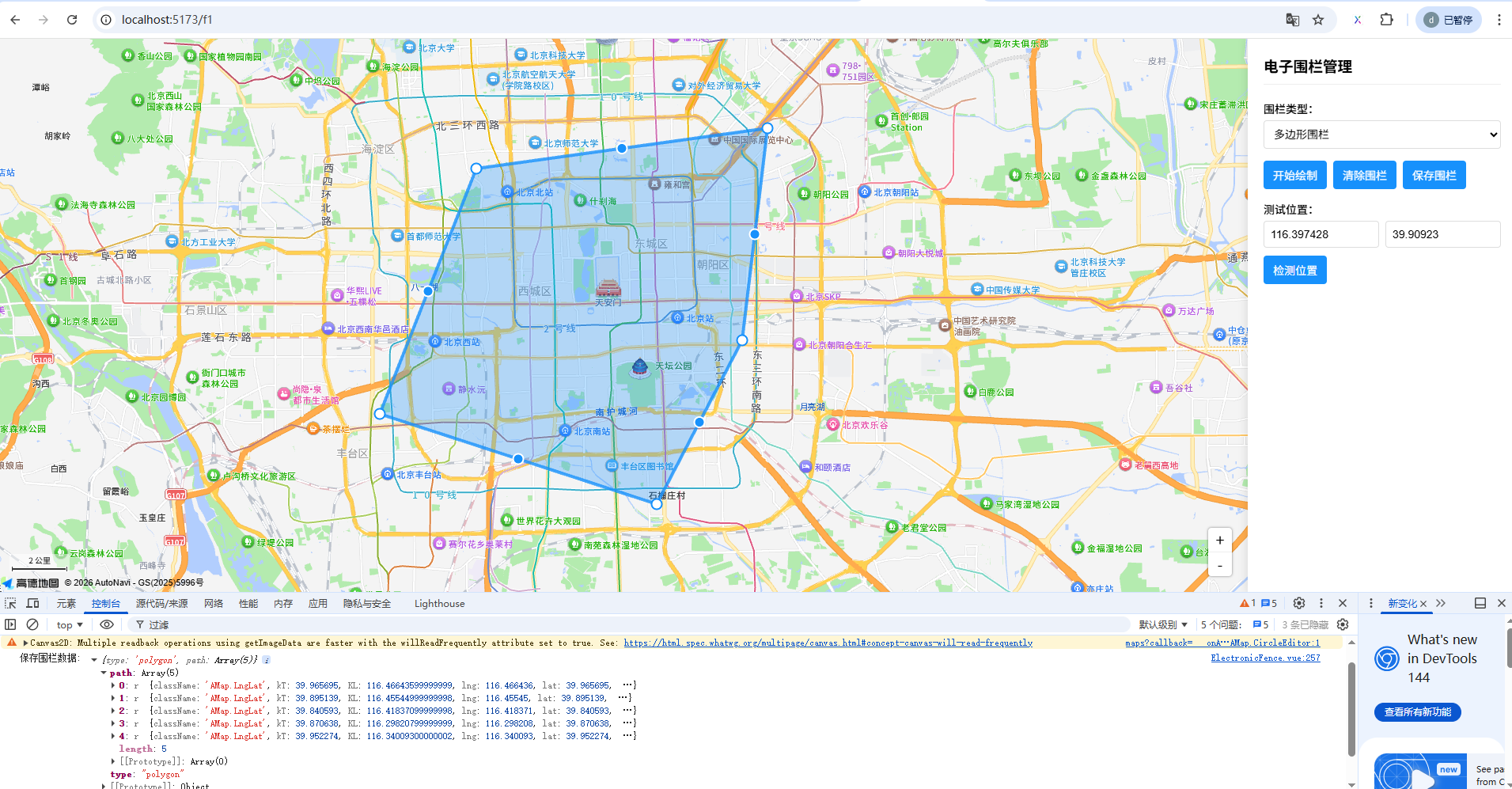
📌 核心功能说明
1. 地图初始化
- 使用
@amap/amap-jsapi-loader按需加载 - 在
onMounted生命周期中进行,确保DOM已渲染 - 配置安全密钥防止盗用
2. 围栏绘制
- 多边形围栏:通过
AMap.Polygon实现,支持任意形状 - 圆形围栏:通过
AMap.Circle实现,设置圆心和半径 - 矩形围栏:作为特殊的多边形实现
- 使用
PolygonEditor/CircleEditor支持拖拽编辑
3. 位置检测
- 调用围栏对象的
contains()方法判断点是否在内部 - 支持实时测试输入坐标
4. 报警机制
- 记录上一次状态,避免重复报警
- 状态变化时(进/出)触发报警
- 报警日志滚动显示
5. TypeScript支持
- 扩展
Window类型添加安全配置 - 声明
AMap命名空间类型
扩展建议
1. 集成真实定位
// 使用Geolocation插件获取真实位置
AMap.plugin('AMap.Geolocation', () => {
  const geolocation = new AMap.Geolocation();
  geolocation.getCurrentPosition((status, result) => {
    if (status === 'complete') {
      const { position } = result;
      testLng.value = position.lng;
      testLat.value = position.lat;
      testPosition();
    }
  });
});
2. 后端集成
- 保存围栏数据时,将坐标发送到后端
- 设备实时位置上报,由后端判断进出事件
- 或使用高德猎鹰服务(Falcon Track Service)
3. 样式定制
- 支持多种围栏颜色和透明度
- 可配置报警音效
- 可扩展多种报警模式(进入报警/离开报警/双向报警)