1. 安装依赖
npm install @amap/amap-jsapi-loader --save
# 或
pnpm add @amap/amap-jsapi-loader --save
2. 添加类型声明
创建 src/types/global.d.ts 文件:
// 扩展Window类型,支持高德地图安全配置
interface Window {
  _AMapSecurityConfig: {
    securityJsCode: string;
  };
}

// 高德地图类型声明(根据需要补充)
declare namespace AMap {
  class Map {
    constructor(container: string, options?: any);
    destroy(): void;
    addControl(control: any): void;
    setCenter(center: [number, number]): void;
    // ... 其他方法
  }

  class Polygon {
    constructor(options?: any);
    setMap(map: Map): void;
    getPath(): any;
    contains(point: [number, number]): boolean;
    on(event: string, handler: Function): void;
  }

  class Circle {
    constructor(options?: any);
    setMap(map: Map): void;
    contains(point: [number, number]): boolean;
  }

  // 其他类型...
}
3、显示车辆位置
<template>
    <div>
        <div id="map-container" style="width: 500px; height: 500px;"></div>
        <div>
            <el-button type="primary" @click="redrawCarPosition">重新绘制</el-button>
        </div>
    </div>
</template>

<script setup lang="ts">
import { ref, onMounted } from 'vue';
import AMapLoader from '@amap/amap-jsapi-loader';

const map = ref(null); // 地图实例
const amap = ref(null);

// 初始化地图
const initMap = () => {
    AMapLoader.reset();
    AMapLoader.load({
        key: '7fac11790025fa9da05e739566ca7af8', // 替换为你的高德地图 API Key
        version: '2.0', // 指定高德地图版本
        plugins: ['AMap.Marker'], // 需要使用的插件
    })
    .then((AMap) => {
        // 初始化地图
        map.value = new AMap.Map('map-container', {
        zoom: 15, // 缩放级别
        center: [116.397428, 39.90923], // 中心点坐标(北京天安门)
        });

        // 绘制车辆位置
        amap.value = AMap;
        drawCarPosition(amap.value);
    })
    .catch((error) => {
        console.error('地图加载失败', error);
    });
};

// 在地图上绘制车辆位置
const drawCarPosition = (AMap) => {
    // 生成10个随机位置的车辆数据
        const centerLng = 116.397428;
        const centerLat = 39.90923;
        const carPositions = [];

        for (let i = 0; i < 10; i++) {
            // 在中心点周围0.01度范围内随机生成位置
            const randomLng = centerLng + (Math.random() * 0.02 - 0.01);
            const randomLat = centerLat + (Math.random() * 0.02 - 0.01);
            // 随机生成在线状态(70%在线,30%离线)
            const isOnline = Math.random() > 0.3;
            carPositions.push({
                lng: randomLng,
                lat: randomLat,
                title: `车辆${i + 1}`,
                isOnline: isOnline
            });
        }

        // 添加10个车辆标记
        carPositions.forEach((car, index) => {
            const carMarker = new AMap.Marker({
                position: [car.lng, car.lat],
                title: car.isOnline ? `${car.title} (在线)` : `${car.title} (离线)`,
                icon: new AMap.Icon({
                    size: new AMap.Size(32, 32),
                    image: car.isOnline ? '/src/assets/car-red.png' : '/src/assets/car-gray.png',
                    imageSize: new AMap.Size(32, 32)
                })
            });
            map.value.add(carMarker);
        });
};

// 重新绘制车辆位置
const redrawCarPosition = () => {
    // 清除地图上所有添加的覆盖物
    map.value.clearMap();

    drawCarPosition(amap.value);
};

// 点击设置位置标记
const showInfoClick = (e) => {
    let text = '您在 [ '+e.lnglat.getLng()+','+e.lnglat.getLat()+' ] 的位置单击了地图!';
    console.log(text);

    // 清除地图上所有添加的覆盖物
    map.value.clearMap();

    // 创建点覆盖物
    let m = new AMap.Marker({
        position: new AMap.LngLat(e.lnglat.getLng(), e.lnglat.getLat())
    });
    map.value.add(m);
}

// 直接设置标记
const setMarketPosition = (lng: any, lat: any) => {
    let text = '您在 [ '+lng+','+lat+' ] 的位置单击了地图!';
    console.log(text);

    // 清除地图上所有添加的覆盖物
    map.value.clearMap();

    // 创建点覆盖物
    let m = new AMap.Marker({
        position: new AMap.LngLat(lng, lat)
    });
    map.value.add(m);
};

onMounted(() => {
    initMap();
});

</script>

<style scoped>

</style>
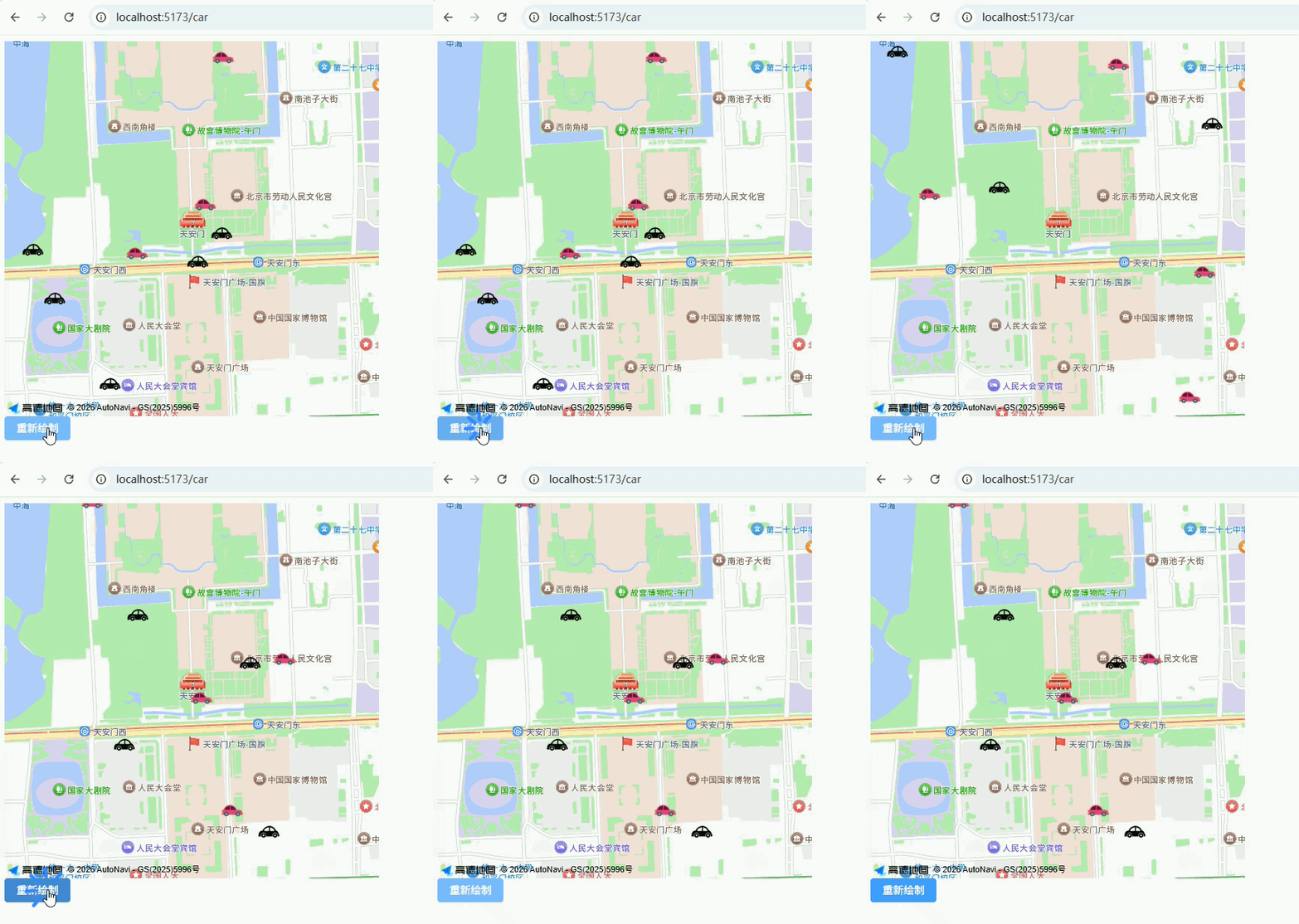
4、显示效果