博主

258
258
258
258
专辑
- 聚福财经专辑 2
- 666 1
- 车联网项目 25
- AI辅助编码 3
- AI智能客服开发(医疗版) 8
- LangChain4J框架 8
- AI大语言模型专辑 4
- Java开发工具资源 1
- 编程基础知识 5
- 默认专辑 0
第十六节 车联网的车辆历史轨迹存储到TDengine时序数据库
亮子
2026-02-27 16:17:32
489
0
0
0
1、建表和写入数据
1)、创建超级表
CREATE STABLE IF NOT EXISTS  demo.vihicle_location (
    ts timestamp,
    lon double,
    lat double,
    speed float,
    direction int,
    altitude float
) TAGS (
    vin varchar(64),
	imei varchar(64)
);
- ts 时间戳
- lon 经度
- lat 纬度
- speed 速度
- direction 方向
- altitude 海拔
标签
- vin 车辆唯一编号
- plate_number 车牌号
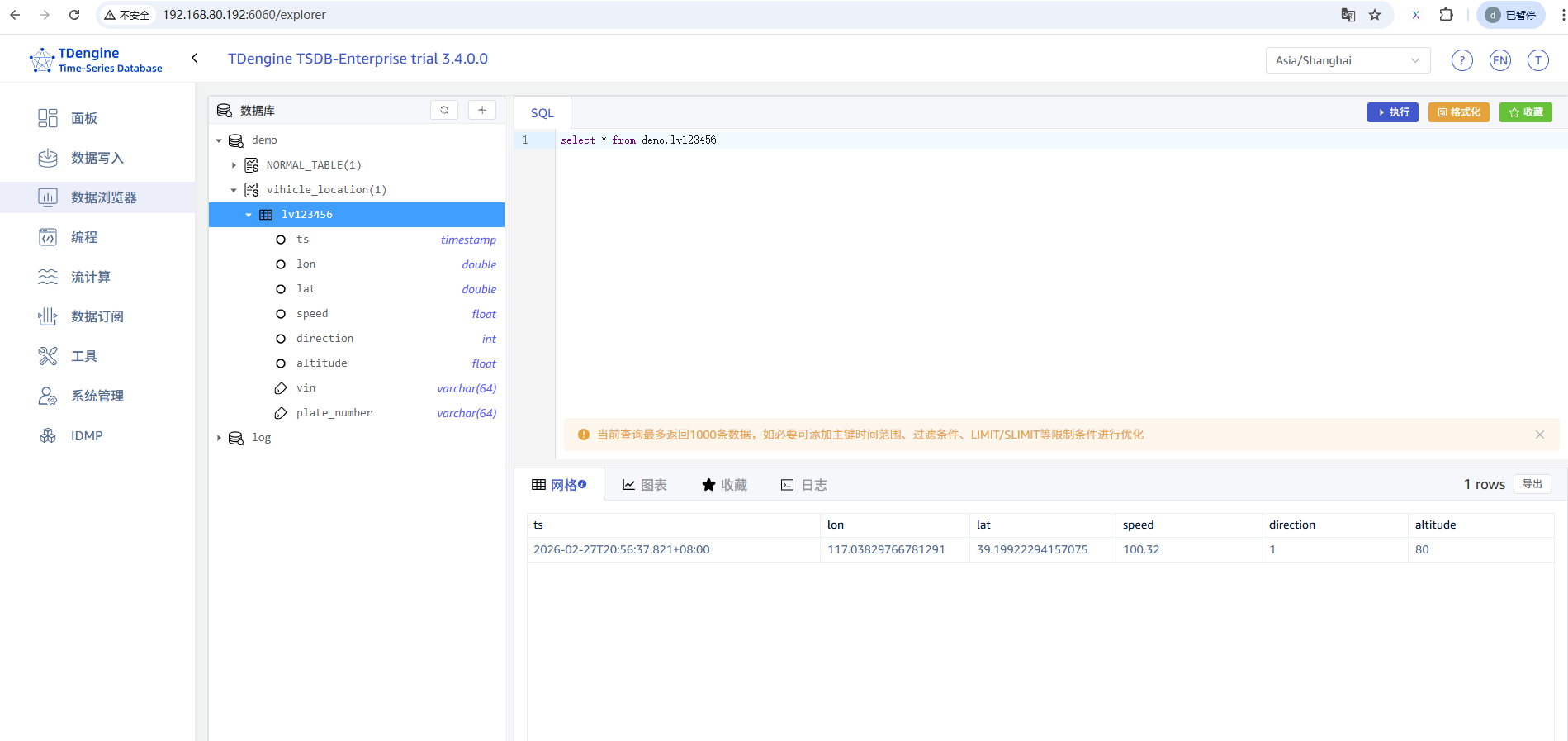
2)、写入数据
子表如果不存在,则会自动创建。所以子表可以不用手动创建。
INSERT INTO demo.lv123456
USING demo.vihicle_location
TAGS (
    "lv123456",
    "im123456"
) VALUES (
    NOW,
    117.03829766781291,
    39.19922294157075,
    100.32,
	1,80
);
2、直接的方式操作数据
package com.shenmazong.controller;

import com.taosdata.jdbc.TSDBDriver;
import org.springframework.web.bind.annotation.GetMapping;
import org.springframework.web.bind.annotation.PostMapping;
import org.springframework.web.bind.annotation.RequestMapping;
import org.springframework.web.bind.annotation.RestController;

import java.sql.*;
import java.util.Properties;

/**
 * @author 军哥
 * @version 1.0
 * @description: TODO
 * @date 2026/2/27 15:01
 */

@RestController
@RequestMapping("/test")
public class TestEngineController {

    @PostMapping("/create")
    public Object create() {
        String jdbcUrl = "jdbc:TAOS-WS://192.168.80.192:6041?user=root&password=taosdata";
        Properties properties = new Properties();
        properties.setProperty(TSDBDriver.PROPERTY_KEY_ENABLE_AUTO_RECONNECT, "true");
        properties.setProperty(TSDBDriver.PROPERTY_KEY_CHARSET, "UTF-8");
        properties.setProperty(TSDBDriver.PROPERTY_KEY_TIME_ZONE, "UTC-8");

        try (Connection connection = DriverManager.getConnection(jdbcUrl, properties);
             Statement stmt = connection.createStatement()) {

            // 创建数据库
            int rowsAffected = stmt.executeUpdate("CREATE DATABASE IF NOT EXISTS demo");
            // you can check rowsAffected here
            System.out.println("Create database power successfully, rowsAffected: " + rowsAffected);
            // 创建超级表
            rowsAffected = stmt.executeUpdate("CREATE STABLE IF NOT EXISTS  demo.vihicle_location (ts timestamp, lon double, lat double, speed float, direction int, altitude float) TAGS (vin varchar(64),imei varchar(64));");
            // you can check rowsAffected here
            System.out.println("Create stable power.meters successfully, rowsAffected: " + rowsAffected);

            return "success";
        } catch (Exception ex) {
            // please refer to the JDBC specifications for detailed exceptions info
            System.out.printf("Failed to create database power or stable meters, %sErrMessage: %s%n",
                    ex instanceof SQLException ? "ErrCode: " + ((SQLException) ex).getErrorCode() + ", " : "",
                    ex.getMessage());
            // Print stack trace for context in examples. Use logging in production.
            ex.printStackTrace();
//            throw ex;
        }
        return "failed";
    }

    @PostMapping("/addRow")
    public Object addRow() {
        String jdbcUrl = "jdbc:TAOS-WS://192.168.80.192:6041?user=root&password=taosdata";
        Properties properties = new Properties();
        properties.setProperty(TSDBDriver.PROPERTY_KEY_ENABLE_AUTO_RECONNECT, "true");
        properties.setProperty(TSDBDriver.PROPERTY_KEY_CHARSET, "UTF-8");
        properties.setProperty(TSDBDriver.PROPERTY_KEY_TIME_ZONE, "UTC-8");

        // insert data, please make sure the database and table are created before
//        String insertQuery = "INSERT INTO " +
//                "power.d1001 USING demo.t TAGS(2,'California.SanFrancisco') " +
//                "VALUES " +
//                "(NOW + 1a, 10.30000, 219, 0.31000) " +
//                "(NOW + 2a, 12.60000, 218, 0.33000) " +
//                "(NOW + 3a, 12.30000, 221, 0.31000) " +
//                "power.d1002 USING power.meters TAGS(3, 'California.SanFrancisco') " +
//                "VALUES " +
//                "(NOW + 1a, 10.30000, 218, 0.25000) ";
        String insertQuery = "INSERT INTO demo.lv123456 \n" +
                "USING demo.vihicle_location \n" +
                "TAGS (\n" +
                "    \"lv123456\", \n" +
                "    \"im123456\"\n" +
                ") VALUES (\n" +
                "    NOW, \n" +
                "    117.03829766781291, \n" +
                "    39.19922294157075, \n" +
                "    100.32,\n" +
                "\t1,80\n" +
                ");";
        try (Connection connection = DriverManager.getConnection(jdbcUrl, properties);
             Statement stmt = connection.createStatement()) {

            int affectedRows = stmt.executeUpdate(insertQuery);
            // you can check affectedRows here
            System.out.println("Successfully inserted " + affectedRows + " rows to power.meters.");
            return "success";
        } catch (Exception ex) {
            // please refer to the JDBC specifications for detailed exceptions info
            System.out.printf("Failed to insert data to power.meters, sql: %s, %sErrMessage: %s%n",
                    insertQuery,
                    ex instanceof SQLException ? "ErrCode: " + ((SQLException) ex).getErrorCode() + ", " : "",
                    ex.getMessage());
            // Print stack trace for context in examples. Use logging in production.
            ex.printStackTrace();
//            throw ex;
        }
        return "failed";
    }


    /**
     * @description 查询结果
     * @params []
     * @return java.lang.Object
     * @author 军哥
     * @date 2026/2/27 16:05
     */
    @GetMapping("/getRows")
    public Object getRows() {
        String jdbcUrl = "jdbc:TAOS-WS://192.168.80.192:6041?user=root&password=taosdata";
        Properties properties = new Properties();
        properties.setProperty(TSDBDriver.PROPERTY_KEY_ENABLE_AUTO_RECONNECT, "true");
        properties.setProperty(TSDBDriver.PROPERTY_KEY_CHARSET, "UTF-8");
        properties.setProperty(TSDBDriver.PROPERTY_KEY_TIME_ZONE, "UTC-8");

        String sql = "SELECT * FROM demo.vihicle_location";
        try (Connection connection = DriverManager.getConnection(jdbcUrl, properties);
             Statement stmt = connection.createStatement();
             // 在查询数据之前,一定要确认表已经创建了
             ResultSet resultSet = stmt.executeQuery(sql)) {

            Timestamp ts;
            float lon;
            String location;
            while (resultSet.next()) {
                // 我们简要使用列的索引来获取列值,这样性能更好。列的索引是1开始计数,切记。
                ts = resultSet.getTimestamp(1);
                lon = resultSet.getFloat(2);

                // 当然可以使用列的名字来获取列值,如下:
//                location = resultSet.getString("location");

                // you can check data here
                System.out.printf("ts: %s, current: %f %n", ts, lon);
            }

            return "success";
        } catch (Exception ex) {
            // please refer to the JDBC specifications for detailed exceptions info
            System.out.printf("Failed to query data from power.meters, sql: %s, %sErrMessage: %s%n",
                    sql,
                    ex instanceof SQLException ? "ErrCode: " + ((SQLException) ex).getErrorCode() + ", " : "",
                    ex.getMessage());
            // Print stack trace for context in examples. Use logging in production.
            ex.printStackTrace();
//            throw ex;
        }
        return "fail";
    }

}