博主

258
258
258
258
专辑
- 聚福财经专辑 2
- 666 1
- 车联网项目 25
- AI辅助编码 3
- AI智能客服开发(医疗版) 8
- LangChain4J框架 8
- AI大语言模型专辑 4
- Java开发工具资源 1
- 编程基础知识 5
- 默认专辑 0
第十八节 SpringBoot项目使用MySQL和TDengine多数据源
亮子
2026-03-09 10:07:53
563
0
0
0
多数据源有多种实现方式,咱们这里使用MyBatisPlus集成的多数据源机制,代码量最少。
1、添加mybatis plus多数据依赖
<dependency>
    <groupId>com.baomidou</groupId>
    <artifactId>dynamic-datasource-spring-boot-starter</artifactId>
    <version>4.2.0</version> <!-- 请使用最新版本 -->
</dependency>
2、修改多数据源的配置文件
- application.yml
server:
  port: 9201

# Spring
spring:
  application:
    # 应用名称
    name: demo-boot
  profiles:
    # 环境配置
    active: dev
  datasource:
    dynamic:
      primary: primary
      strick: false
      datasource:
        primary:
          driver-class-name: com.mysql.cj.jdbc.Driver
          url: jdbc:mysql://192.168.80.192:3306/ry-cloud?serverTimezone=GMT%2B8&useSSL=false&useUnicode=true&characterEncoding=utf8
          username: root
          password: root
          druid:
            initial-size: 5
            min-idle: 5
            maxActive: 20
            maxWait: 60000
            connectTimeout: 30000
            socketTimeout: 60000
            timeBetweenEvictionRunsMillis: 60000
            minEvictableIdleTimeMillis: 300000
            validationQuery: SELECT 1 FROM DUAL
            testWhileIdle: true
            testOnBorrow: false
            testOnReturn: false
            poolPreparedStatements: true
            maxPoolPreparedStatementPerConnectionSize: 20
            filters: stat,slf4j
            connectionProperties: druid.stat.mergeSql\=true;druid.stat.slowSqlMillis\=5000
        taos:
          # 使用Druid连接池
          type: com.alibaba.druid.pool.DruidDataSource
          # TDengine的JDBC驱动类名
          driver-class-name: com.taosdata.jdbc.ws.WebSocketDriver
          # JDBC URL: jdbc:TAOS://{host}:{port}/{database_name}
          url: jdbc:TAOS-WS://192.168.80.192:6041/demo?charset=UTF-8&locale=en_US.UTF-8&timezone=UTC-8
          username: root
          password: taosdata
          druid:
            initial-size: 5
            min-idle: 5
            max-active: 10
            max-wait: 60000
            # 验证连接是否有效的SQL (TDengine特定)
            validation-query: select server_status()
            test-while-idle: true
            test-on-borrow: false
            test-on-return: false

  #配置json时间格式
  jackson:
    date-format: yyyy-MM-dd HH:mm:ss
    time-zone: GMT+8
# MyBatis配置
mybatis:
  # mapper XML文件的位置
  mapper-locations: classpath:mapper/*.xml
  # 实体类所在的包
  type-aliases-package: com.shenmazong.entity
  configuration:
    # 开启驼峰命名自动转换
    map-underscore-to-camel-case: true

# 日志 (方便调试SQL)
logging:
  level:
    com.shenmazong.mapper: debug
3、定义mapper接口以及xml文件
- MdataMapper类
package com.shenmazong.mapper;

import com.shenmazong.entity.SysUser;
import com.shenmazong.entity.VehiclePosition;
import org.apache.ibatis.annotations.Mapper;

import java.util.List;

/**
 * @author 军哥
 * @version 1.0
 * @description: TODO
 * @date 2026/3/9 9:18
 */

@Mapper
public interface MdataMapper {
    // 使用TDengine时序数据库
    int insertVehiclePosition(VehiclePosition vehiclePosition);
    List<VehiclePosition> selectAllByVin(String vin, String beginTime, String endTime);
    List<VehiclePosition> selectAllByImei(String imei, String beginTime, String endTime);

    // 使用MySQL数据库
    SysUser getUserByName(String name);
}
- MdataMapper.xml
<?xml version="1.0" encoding="UTF-8" ?>
<!DOCTYPE mapper
        PUBLIC "-//mybatis.org//DTD Mapper 3.0//EN"
        "http://mybatis.org/dtd/mybatis-3-mapper.dtd">

<mapper namespace="com.shenmazong.mapper.MdataMapper">
    <insert id="insertVehiclePosition" parameterType="com.shenmazong.entity.VehiclePosition">
        INSERT INTO demo.#{vin}
            USING demo.vehicle_location
        TAGS (
            #{vin},
            #{imei}
        ) VALUES (
            #{ts},
            #{lon},
            #{lat},
            #{speed},
            #{direction},
            #{altitude}
         );
    </insert>


    <select id="selectAllByVin" resultType="com.shenmazong.entity.VehiclePosition">
        select * from demo.${vin} where ts between #{beginTime} and #{endTime} order by ts limit 10
    </select>
    <select id="selectAllByImei" resultType="com.shenmazong.entity.VehiclePosition">
        select * from demo.vehicle_location where imei= #{imei} and ts between #{beginTime} and #{endTime} order by ts
    </select>
    <select id="getUserByName" resultType="com.shenmazong.entity.SysUser">
        select * from sys_user where user_name = #{userName}
    </select>
</mapper>
4、编写测试接口
package com.shenmazong.controller;

import com.baomidou.dynamic.datasource.annotation.DS;
import com.shenmazong.entity.VehiclePosition;
import com.shenmazong.mapper.MdataMapper;
import org.springframework.beans.factory.annotation.Autowired;
import org.springframework.web.bind.annotation.PathVariable;
import org.springframework.web.bind.annotation.PostMapping;
import org.springframework.web.bind.annotation.RequestParam;
import org.springframework.web.bind.annotation.RestController;

import java.util.List;

/**
 * @author 军哥
 * @version 1.0
 * @description: TODO
 * @date 2026/3/9 9:52
 */

@RestController
public class TestController {

    @Autowired
    MdataMapper mdataMapper;

    @DS("taos")
    @PostMapping("/getTrackInfo")
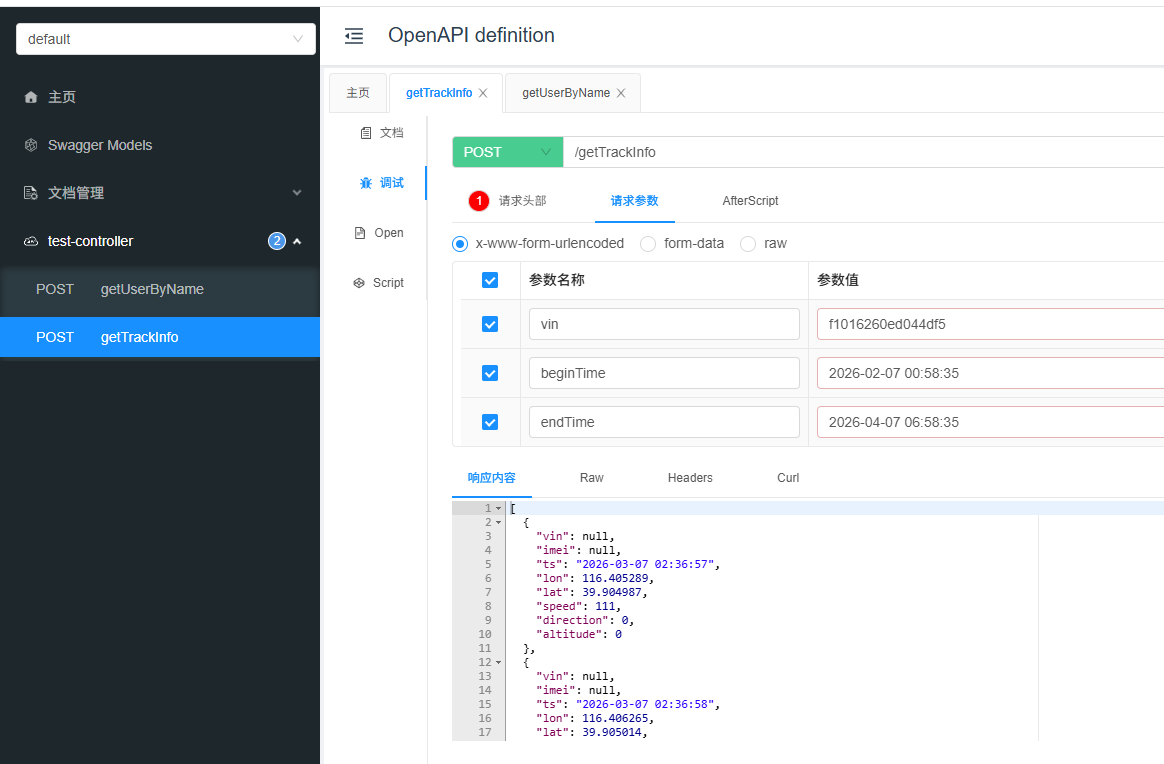
    public Object getTrackInfo(@RequestParam("vin") String vin, @RequestParam("beginTime") String beginTime,
                               @RequestParam("endTime") String endTime) {

        List<VehiclePosition> vehiclePositions = mdataMapper.selectAllByVin(vin, beginTime, endTime);

        return vehiclePositions;
    }

    @DS("primary")
    @PostMapping("/getUserByName/{userName}")
    public Object getUserByName(@PathVariable("userName") String name) {
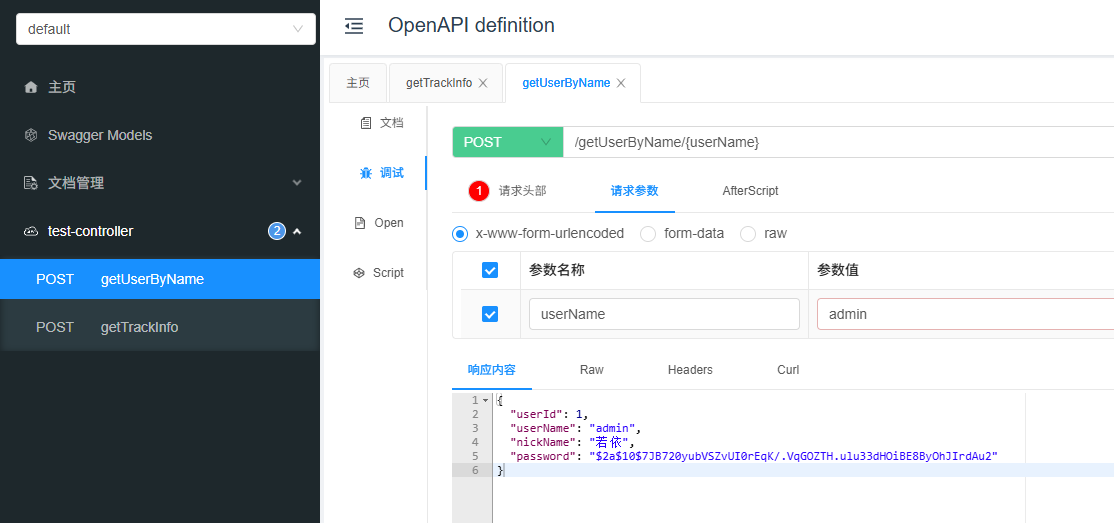
        return mdataMapper.getUserByName(name);
    }

}
5、项目结构以及测试结果
- 项目结构
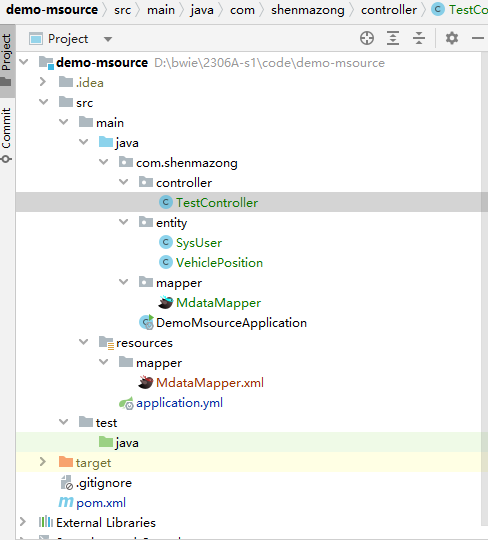
- mysql数据源接口测试
- TDengine数据源接口测试